What Is Bold Text? (And What Is a Bold Text Generator?)
Bold text is text that appears thicker and darker than regular text. It uses a heavier stroke weight, which makes letters stand out from the surrounding content. You've seen it in headings, key points, and important information across books, websites, and apps.
When you bolden words, you give them weight. That weight signals to the reader: pay attention here. If you want cool fonts, bold letters naturally attract attention. They make sentences easier to scan, highlight important words, and help readers find the most relevant details fast.
Bold text serves a clear purpose:
- Emphasize critical ideas
- Highlight key points in a paragraph
- Help numbers and specific details pop
- Make headings visible and easy to navigate
- Add a bold style that feels strong and professional
Now, here's where a Bold Text Generator comes in.
A bold text generator is a free, online tool that converts plain characters into bold-looking text using a converter. You type your plain text, and it generates bold font styles instantly. The result is a distinctive generated string you can copy and paste anywhere — social media posts, articles, comments, presentations, and more.
Unlike a font generator that installs font files, this tool runs in your browser. No downloads. No plugins. Just quick, effortless results in seconds.
Whether you're a professional crafting content or someone writing a comment section reply, a bold letters generator makes the process simple. You get attention-grabbing, bold text font output that works across platforms — completely free.
How the Bold Text Generator Works (The Unicode Explained)
The magic behind this tool is Unicode characters.
Unicode is a universal system that assigns a unique code to every character — letters, numbers, and symbols — across all languages and platforms. When you use this tool, it takes your plain text and converts each plain character into bold unicode characters from specific unicode styles.
Here's what happens step by step:
- You type your text into the tool
- The tool runs unicode transformations on each character
- It pulls from character maps of bold unicode characters and unicode symbols
- It returns a generated string of converted characters
- You preview and copy those copy-paste characters instantly
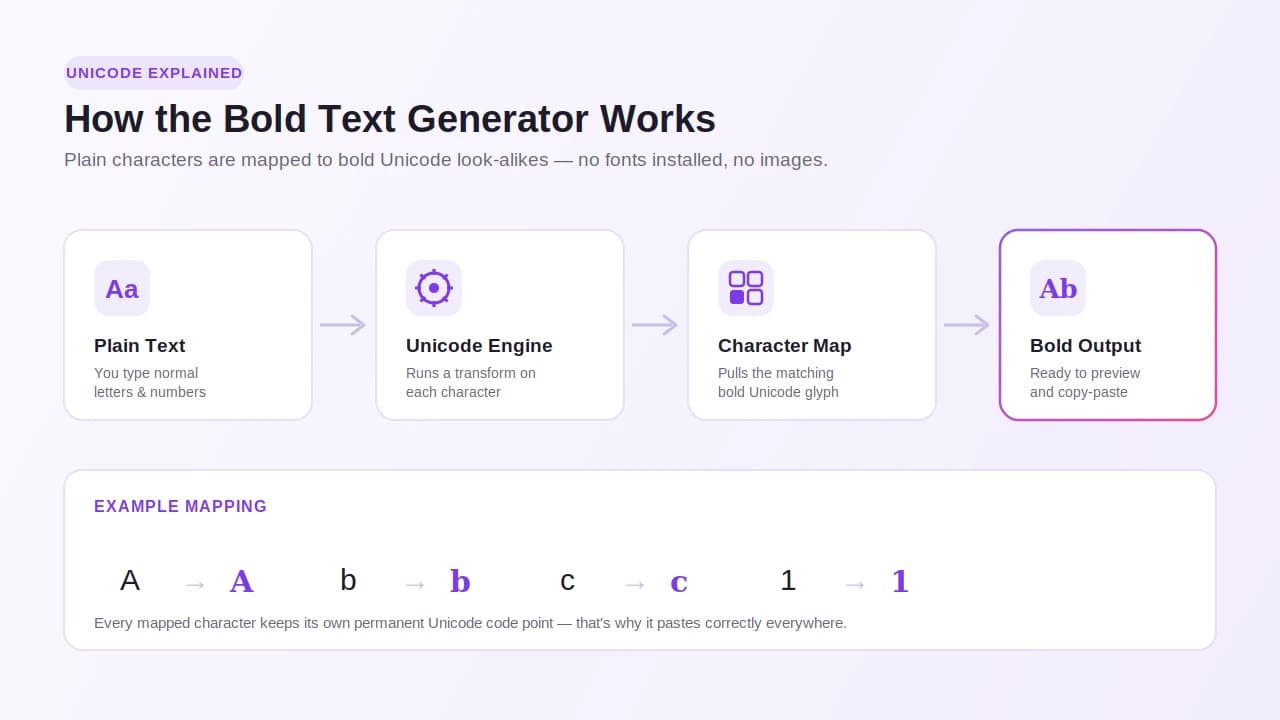
The tool generates text from several unicode styles, including:
| Style Name | What It Looks Like |
|---|---|
| Mathematical bold | Classic thick, heavy letters |
| Sans-serif bold | Clean, modern bold characters |
| Bold italics | Slanted and bold together, similar to our italic fonts |
| Double-struck | Hollow, outlined look |
| Fraktur / Blackletter styles | Old German decorative alphabets |
| Script / Cursive unicode | Flowing, handwritten cursive fonts style |
| Bubble | Letters inside circles |
| Circled text | Enclosed in round shapes |
| Squared unicode | Letters inside square blocks |
| Small caps | Smaller uppercase-style letters |
These unicode text styles look bold but are not traditional font files. They are actual unicode text — which means they appear and display correctly across supported platforms, websites, web browsers, and devices without installing fonts, font files, installs, downloads, or plugins.
The tool runs entirely in your browser. It's online, fast, and simple. You type, generate, preview, and get your result — instantly. No scientific notation expertise needed. No formatting buttons or mathematical notation knowledge required.
This is what separates unicode text art from regular text formatting. The characters themselves carry the style. So they work anywhere plain text is accepted — which is almost everywhere.
How to Use the Online Bold Text Converter
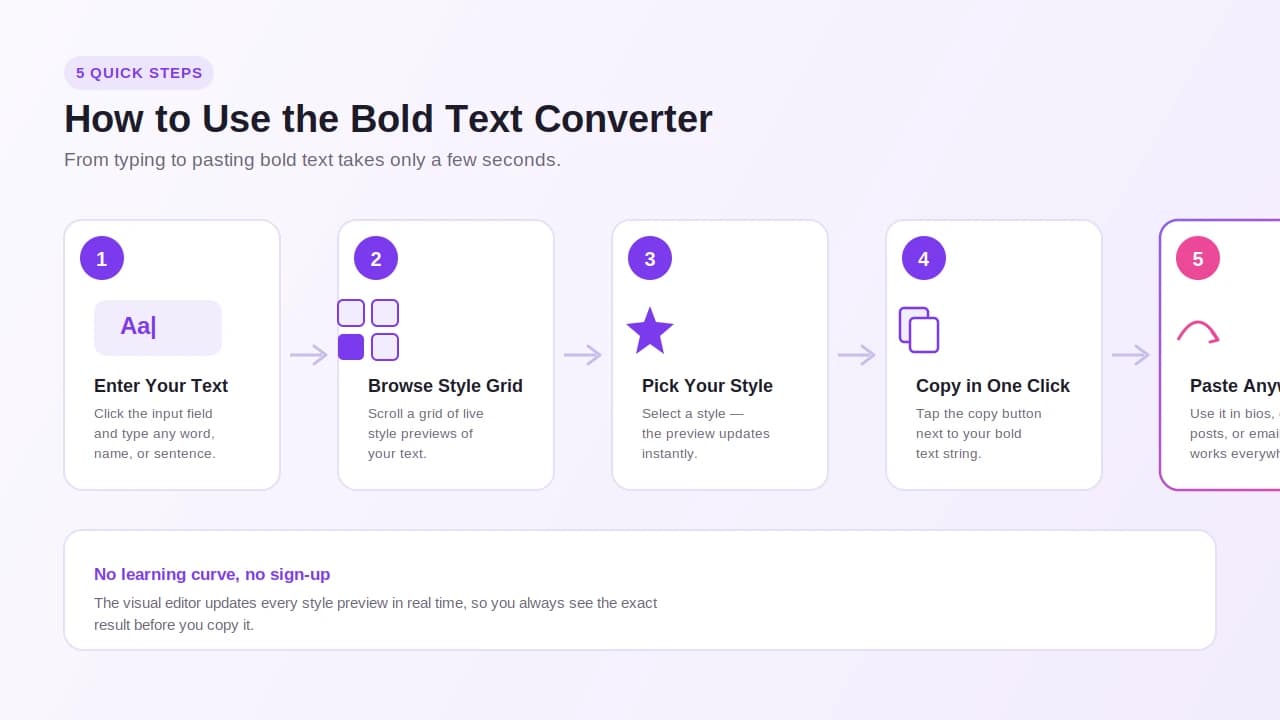
Using this bold text generator takes only a few seconds. There's no learning curve. Here's exactly how it works:
Step-by-Step Instructions
Step 1 — Enter Your Text
Click the input field (also called the input bar or text field). Type your text directly into the input. You can type anything — a word, a sentence, a name, or a full paragraph.
Step 2 — Browse the Style Grid
Below or beside the input, you'll see a grid of bold text styles. Each option shows a live preview of how your text looks in that style. Scroll through and choose the one that fits your purpose.
Step 3 — Pick Your Style
Select the style you prefer. You can try multiple options. The visual editor updates the preview in real time so you can see the result before copying.
Step 4 — Copy with One Click
Click the one-click copy button next to the generated string. Your bold text is now on your clipboard.
Step 5 — Paste Anywhere
Go to wherever you want to use it — comments, chats, messages, posts, bios, profiles, emails, or web pages — and paste it directly.
Other Ways to Bold Text
Outside of this tool, some apps and platforms offer built-in formatting options. Here's a quick comparison:
| Method | How It Works | Where It Works |
|---|---|---|
| This bold text converter | Type → Select → Copy → Paste | Almost all platforms |
| Keyboard shortcut CTRL+B | Activating bold in Windows apps | Text editors, HTML editor, MS Word |
| Command+B shortcut | Applying bold on MacOS | Apple apps, Pages, Keynote |
| HTML & CSS | Use `<strong>` tags or `font-weight` property as inline style or css style with css styles declaration | Web pages, emails |
| Formatting button options | Click formatting buttons inside apps | Some emails, chats, applications |
For social media, comment sections, and most online platforms, those built-in formatting options don't work. That's where this online bold text converter becomes the easiest and most effortless solution — free, quick, and ready in seconds.
You can also test any feature inside the editor before committing to a style. Just edit the input text, watch the preview update, and generate code or copy the result whenever you're ready.
Explore 300+ Bold & Unicode Text Styles
This tool gives you access to a collection of 300+ unique styles — all in one place.
That's not an exaggeration. The selection covers a wide range of bold text styles, font styles, and fancy fonts styles built from fancy unicode, cute fonts, and decorative alphabets. Whether you want something clean and professional or something playful and stylish, there's an option for you.
Style Categories You Can Explore
Classic Bold Styles
- Mathematical bold
- Sans-serif bold
- Bold italic and bold italics
- Small caps
Decorative & Artistic
- Fraktur and blackletter styles
- Double-struck characters
- Cursive and script styles
- Bubble and circled text
- Squared unicode and blocks
Creative & Visual
- Text art and unicode text art
- Text faces and frames
- Decorative text and decorative alphabets
- Retro graphics and vintage styles
- Flowing letterforms for a creative look
Stylish & Unique
- Fancy unicode transformations
- Standout copy styles
- Fresh and distinctive options
The stylish fonts bold text generator mode lets you try styles side by side. You can choose based on your purpose and context. A bold italic may fit a caption. A blackletter style may suit a gaming tag. A clean sans-serif bold may work best for a professional bio.
The style options update regularly. New styles ship often, and the hand-picked selection keeps growing. So every time you come back, there's something fresh to explore and try.
Personalize your output. Reflect your tone. Enhance your content. Whether you're improving a social post or crafting standout copy, the right bold font style makes a real difference.
Decoration Mode — Add Art Around Your Words
Beyond bold styles, this tool offers a decoration mode — a feature that lets you add symbols, frames, and text art directly around your words.
This is where text goes from plain to eye-catching.
What Decoration Mode Lets You Do
- Add emojis and Unicode symbols around your text
- Wrap your words in decorative frames
- Use text art and drawing styles for a creative look
- Apply decorative alphabets that reflect a specific mood or theme
- Create standout copy that's stylish and distinctive
This feature is especially useful for:
| Use Case | Example |
|---|---|
| Fun posts and social posts | Add playful symbols and emojis around a caption |
| Gaming tags | Bold names wrapped in sharp frames or retro graphics |
| Logos and branding | Paper vintage or flowing letterform styles |
| Invitations | Decorative text with elegant frames |
| Posters and flyers | Eye-catching creative styling |
| Promotional material | Bold text enhanced with symbols |
| Personal projects | Unique bios, messages, and comments |
The decoration mode is designed to enhance your content — not overcomplicate it. You decorate, preview, and copy. It's that simple.
Once you've styled and decorated your text, use the one-click copy button to grab the generated string. Then paste it into any message, bio, or comment — directly, without extra steps.
Everything runs free and online, right in your browser. No installs. No sign-ups. Just open, decorate, and reuse as often as you need.
Favorites & Fixed Styles — Save What You Love
Found a bold style you keep coming back to? The favorites feature is built for exactly that.
With this tool, you can save your preferred styles for quick access. Instead of scrolling through 300+ options every time, your saved selection stays ready for you.
How It Works
- Browse the style grid and find styles you love
- Mark them as favorites with a single click
- Access them instantly the next time you use the tool
- Copy and paste the generated string without starting from scratch
The fixed styles option works similarly. Some styles stay pinned in your view so you can grab them fast. This is especially useful if you use the same style across:
- Multiple accounts or a single account
- Posts, comments, and messages on different platforms
- Names, bios, and profiles across supported sites
- Regular content updates and daily social posts
This tool is designed for speed. Saving favorites cuts down the time between opening the tool and getting your result. One-click copy does the rest.
A few more things worth knowing:
- Free of charge — always, no payment required
- No sign-ups — no account creation needed
- No subscriptions — use it as often as you want
- Privacy-friendly — your input stays yours
- Accessible — works on desktop and mobile
- Available — runs in any browser, on any supported device
- Regularly updated — fresh options ship often
Whether you use it once a day or once a week, the favorites and fixed styles feature makes the process faster for generators tools users who want guaranteed results without the repeat effort.
Where Can You Use Bold Text? (Popular Use Cases)
Bold text works almost anywhere — and the list of places keeps growing. Here's a breakdown of the most popular platforms and contexts where people use this tool every day.
Social Media
| Platform | Common Uses |
|---|---|
| Bios, captions, comments — bold text generator Instagram users love it for aesthetic profiles and bold fonts copy paste aesthetic fonts posts | |
| Bold text generator Facebook users apply it to posts, comments, and group discussions | |
| Twitter/X | Tweets, thread openers, and bold fonts copy paste for attention-grabbing hooks |
| TikTok | Bios and video captions |
| Professional headlines, bios, and post formatting |
Bold text helps your content stand out in crowded feeds. It attracts attention, drives likes and shares, and keeps your profile memorable.
Writing & Publishing
- Articles and news articles — highlight key information for readers
- News websites — make headlines and subpoints scannable
- Product descriptions — call out features and offers
- Tutorial websites — mark important steps clearly
Professional & Business
- Presentations — make key points land harder
- Emails — guide readers to the most important details
- Legal documents — mark critical clauses or terms
- Advertising and marketing — push a message or promote an offer
- Branding and graphic design — add a strong visual identity
Creative & Personal
- Gaming tags and online forums — stand out with a unique name
- Design mockups and logos — test bold styles before finalizing
- Flyers, posters, and promotional material — grab attention fast
- Comments and chats — make messages more memorable
Other Uses
- Messages between friends or groups
- Web pages and web design projects
- Education — highlight important terms for students
- Bios and profiles across multiple platforms
Bold text is a trend in online writing because it works. Creators, professionals, and everyday users all rely on it to make their content stick.
Why Unicode Bold Fonts Work on Almost Every Platform
Here's a question people ask often: Why does this text look bold everywhere I paste it?
The answer is unicode characters.
Unicode is a global standard. Every device, browser, and app reads the same unicode symbols the same way. So when this tool converts your plain text into converted characters from the unicode system, those characters display correctly — no matter where you paste them.
Why This Matters
Most formatting tools rely on built-in formatting like HTML or CSS. Those only work inside apps or platforms that support that specific format. The moment you paste formatted text into a plain text field, the formatting disappears.
Unicode bold fonts are different. The characters themselves carry the style. There's no hidden code. The generated string is just text — but text that looks bold on its own.
| Factor | Traditional Formatting | Unicode Bold Text |
|---|---|---|
| Works in social media posts | Sometimes | Yes |
| Works in chats and chat apps | Rarely | Yes |
| Works in comment sections | Rarely | Yes |
| Works in apps and forums | Depends on support | Yes |
| Needs plugins or installs | Sometimes | No |
| Works without downloading fonts | No | Yes |
This is why the copy-paste approach is so powerful. The converted characters appear and display correctly on:
- Desktop and mobile devices
- Web browsers (all major ones)
- Websites and apps
- Social media platforms
- Chat apps and online forums
The tool is also browser-based — it runs directly online, with no installs, no plugins, and nothing to download. It's fast and reliable every time.
One more important note: this tool is privacy-friendly. Your input is processed locally and not stored. Your text stays yours.
And for screen reader users and accessibility-focused content, unicode bold characters are still readable by most screen readers — making them a solid choice for core styling across diverse audiences.
When Should You Use Bold Text? (Tips for Effective Use)
Bold text is powerful — but only when used right. Here are practical tips to help you use it strategically and get strong results.
Use Bold Text To:
- Emphasize one or two key points per section
- Highlight important words, not entire paragraphs
- Mark headings so readers can scan fast
- Call out numbers or specific details that matter
- Draw attention to an offer, a hook, or a call to action
- Make a message clear and impactful in short phrases
Avoid These Common Mistakes:
1. Overusing bold in a long post
If everything is bold, nothing stands out. Use it sparingly. In a lengthy post, bold should appear in 2–4 places at most.
2. Bolding full sentences unnecessarily
Bold works best on short phrases or individual words — not full sentences or long paragraphs.
3. Using bold without purpose
Ask yourself: Does this need emphasis? If the answer is no, skip the styling. Context matters.
4. Bolding so frequently it feels flat
When bold appears too often, the page loses contrast and the effect disappears. Keep it distinctive.
A Simple Rule to Follow
Bold the what and the why — not everything in between.
For example:
❌ "This week we are running a special promotion on our products and services."
✅ "This week we're running a special promotion — don't miss it."
The second example uses pretty fonts style with intention. It improves the content, captures attention, and makes the most important detail visible without overwhelming the reader.
Adding bold to the right words makes your content stronger. Use it with purpose, keep it strategic, and the results will show.
What Makes This Bold Text Generator Different
There are many tools online. Here's why this one is worth using — and coming back to.
It's Built Around What You Actually Need
This bold text generator isn't just a simple converter. It's a full-featured bold font generator with a growing library of styles, a decoration mode, a favorites system, and instant one-click copy. Everything is designed around speed and results.
No Friction. No Cost.
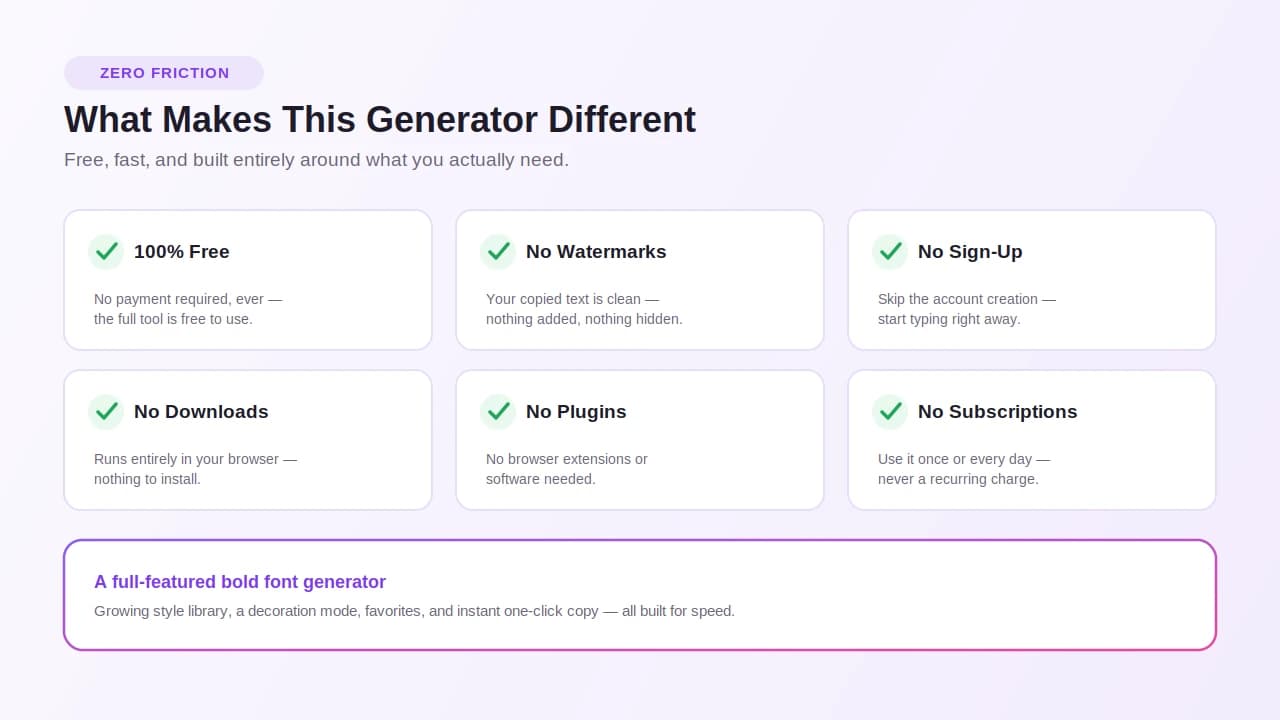
| Feature | This Tool |
|---|---|
| Free | Yes — completely free of charge |
| No watermarks | Correct — your output is clean |
| No payment required | None |
| No sign-ups | Not required |
| No subscriptions | Never |
| Installs not required | Runs entirely in browser |
| Downloads needed | None |
| Plugins needed | None |
It Covers More Ground
This isn't just a bold letters generator. It's a stylish bold text generator with 300+ options — from clean bold font styles to fancy bold text fonts, from bolder font options to decorative bold text styles. Whether you need something professional or something creative, the selection covers it.
You get:
- Instant preview as you type your input text
- Transform your plain text into any style instantly
- Simple interface with fast output
- Fresh options that update regularly
- Guaranteed consistent results every time
Our platform also recommends checking out calligraphy fonts for formal styles.
Looking for a big bold text generator? Or a colour bold text generator for visual projects? Or a bold font free option without needing a bold font free download? This tool covers all of it — online, in your browser, with no installs required.
Some generators tools feel clunky or outdated. This one is built to stay current, stay fast, and deliver distinctive, effective results every time you try it.
Benefits of Using a Bold Text Generator
Let's bring it all together. Here's why using this tool is worth it.
Key Benefits at a Glance
| Benefit | What It Means for You |
|---|---|
| Captures attention | Your content stands out in feeds, pages, and comment sections |
| Enhances readability | Bold font styles make content easier to scan and skim |
| Saves time | Generate and copy in seconds — quick and effortless |
| Works everywhere | Supported on all major platforms and devices |
| Free and accessible | No cost, no sign-up, available to anyone online |
| Personalizes your content | Choose bold text styles that reflect your tone and purpose |
Who Benefits Most
- Creators who want memorable, attention-grabbing posts
- Professionals who need strong, clear content for presentations and emails
- Marketers running advertising, branding, or marketing campaigns
- Designers building design mockups, logos, or promotional material
- Everyday users who want to impress social media friends, grow followers, and earn more likes and shares
Why It Works
Bold text styles make content distinctive. They give your message a visual edge. When used well, they make readers stop, read, and respond.
This tool makes improving your content effortless. You don't need design skills. You don't need CSS knowledge. You don't need to install anything. Just open the tool, type, convert, copy, and paste. The experience is simple, fast, and effective.
Whether you're enhancing a bio, adding decorative text to a post, or making a headline stronger — this Bold Text Generator gives you the tools to do it right, every time, for free.
FAQs
1. Is Bold Text free to use?
Yep, 100% free — no sign-ups, no subscriptions, no sneaky paywalls, just type your text and grab your bold output whenever you want.
2. What styles does Bold Text include?
We've packed over 300 styles in there — everything from clean mathematical bold and sans-serif bold to fraktur, bubble letters, cursive script, small caps, squared unicode, and a whole decoration mode with frames and symbols.
3. Can I use Bold Text on social media?
Absolutely — since our output is built on Unicode characters, it pastes perfectly into Instagram, Facebook, Twitter, TikTok, LinkedIn, and pretty much any platform that accepts plain text.
4. How to make Facebook bold text?
Type your text into our generator, pick a bold style you like, hit the copy button, then paste it straight into your Facebook post, comment, or bio — Facebook reads Unicode just fine.
5. How to make Instagram bold text?
Same deal — generate your bold text here, copy it, and paste it into your Instagram caption, bio, or comment section; Instagram won't strip it because it's actual Unicode, not hidden formatting.
6. Can I use Bold Text for websites or design mockups?
For sure — designers use our styles to test headline weight, mock up logos, and preview how bold text looks before committing to a final design or HTML layout.
7. Can I use these for gaming names or Discord handles?
Go for it — a lot of gamers grab fraktur, double-struck, or squared unicode styles here to make their tags and Discord usernames look sharp and memorable.
8. How to bold text in mobile keyboard?
Most mobile keyboards don't natively bold text for social apps, so the easiest workaround is generating your bold text here on your phone's browser, copying it, then pasting wherever you need it.
9. How do I make my font bold?
Just type your words into our input field, scroll through the style grid, pick a bold option, and boom — your plain text transforms into a bold font you can copy instantly.
10. How to copy and paste fonts without losing formatting?
Use Unicode-based output like ours — because the "bold" lives inside the character itself rather than in hidden code, it survives copy-pasting into almost any text field intact.
11. Best online tools for copying and pasting decorative fonts?
Honestly, that's exactly what we built this site for — one place, 300+ unique styles, one-click copy, no installs, and it runs right in your browser on desktop or mobile.
12. Why don't some symbols display properly on my device?
Older devices or outdated operating systems sometimes lack full Unicode support, so a few fancy characters might show as boxes — updating your OS or browser usually fixes it.
13. Is my data saved anywhere?
Nope — your input is processed right in your browser and never stored on our servers, so whatever you type stays yours and disappears the moment you close the tab.
14. Why are bold fonts important?
Because they make your key points impossible to miss — bold text pulls the reader's eye exactly where you want it, turning a wall of words into something scannable and punchy.
15. Are bold fonts easier to read?
In short bursts, yes — bold highlights guide the eye to important words faster, but slapping bold on entire paragraphs actually slows reading down, so use it like seasoning, not the whole meal.
16. When should you use bold words?
Use them when you need one or two words to scream "look here" — a product name, a deadline, a hook, a warning — keep it to short phrases so the emphasis actually hits.