What Is a Cool Font Generator
A cool font generator is a free online tool built for one simple job. It takes your plain, regular text and turns it into fancy, stylish letters you can copy and paste anywhere on the internet. Think of it as a font converter that works instantly. You type a word into the box, and the generator hands you back dozens of unique looks, from bold and italic to cursive, script, gothic, and old english. That's the whole idea behind cool fonts copy and paste: type once, browse the results, then copy your favorite style and paste it wherever you write.
Here's the part most people never stop to think about. A font generator doesn't actually create brand-new fonts. Your phone or computer already has its own fonts installed, and a website can't force a new one onto your screen. Instead, a cool fonts generator works like a clever translator. It swaps your regular letters for special characters that live inside the unicode standard, the universal, international standard used to give every character, number, and symbol its own unique spot in a giant character set. Bold text, bubble letters, and gothic-style writing are all real characters inside that encoding, not custom fonts. That's why you can copy them like normal text and paste them into a caption, chat, or bio without installing anything.
A single word can wear a lot of different looks once you start converting it:
- Bold fonts and italic fonts for quick emphasis
- Cursive fonts and script fonts for a handwritten feel
- Gothic fonts, old english, and calligraphy fonts for a dramatic touch
- Cool symbols, special characters, emojis, arrows, math symbols, and punctuation marks to decorate your text
One thing is worth knowing before you dive in. Not every fancy, stylized font is widely supported. Since these styles depend on special unicode symbols instead of your device's regular alphabet, some older devices, apps, and platforms won't display them correctly, and screen readers used for accessibility can struggle to read them aloud. For everyday writing, plain text still works best. Save your cool fonts for the situations where a little extra style helps, like a bio, a name, or a short caption people will simply look at and enjoy.
How to Copy and Paste Cool Fonts
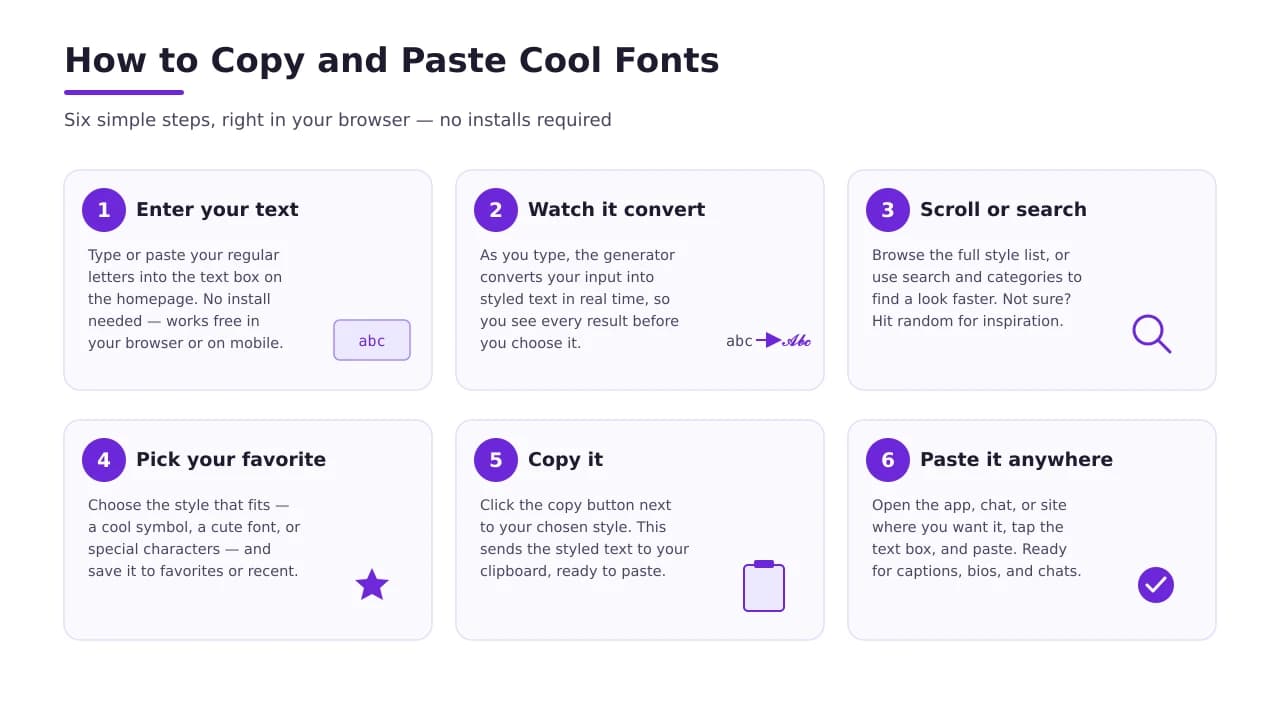
Copying and pasting a cool font takes just a few seconds once you know where to look. Whether you want aesthetic fonts copy and paste for your bio or cute fonts copy and paste for a birthday message, the steps stay the same.
- Enter your text. Type or paste your regular letters into the text box on the homepage. There's nothing to install — the tool works free, right in your browser or mobile version.
- Watch it convert. As you type, the generator converts your input into styled text in real time. Every option is previewed instantly, so you see exactly how each result will look before you choose it.
- Scroll or search. Browse the full list of styles, or use the search and category features to find a look faster. Not sure what you want? Hit random and let the generator inspire you with something new.
- Pick your favorite. Choose the style that fits your needs, whether that's a cool symbol, a cute font, or a full set of special characters, and add it to your favorites or recent tab so it's easy to find again.
- Copy it. Click the copy button next to your chosen style. This sends the styled text straight to your clipboard, ready to paste.
- Paste it anywhere. Open the app, chat, forum, or website where you want to use it, tap into the text box, and paste. Your cool font is ready to post, from social captions to comments in busy forums and chats.
You'll also find matching symbols and emojis so your text and icons feel like they belong together. Search “cool fonts copy and paste emojis” inside the tool, and pair a styled sentence with the perfect emoji in seconds.
A quick note on compatibility: because these styles are built from unicode characters, not custom font files, most results display correctly on modern phones, computers, and apps. A very old device might show a plain letter or a small box instead, so it's smart to preview your text before posting it somewhere important, like a resume or a design project.
Trending Cool Font Styles for 2026
Typography trends shift every year, and 2026 is no different. Across the web, a handful of looks are dominating bios, headers, and captions right now.
| Trend | The Look | Best For |
|---|---|---|
| Vaporwave | W i d e text with extra spacing, paired with a retro futurism feel | Headers and single-word, minimalist bios |
| Glitch / Zalgo Text | Combining marks stack vertically on your letters, making text look corrupted and chaotic | Horror-themed posts, gaming communities, and edgy servers |
| Monospace / Typewriter | Clean, structured, tech-focused letters that mimic a coding environment | Portfolios, developer bios, and anything with an architectural feel |
| Vintage Small Caps | Small caps and superscript shrink your letters into a subtle, tiny text style | Sophisticated captions and personal branding |
Each style pulls its power from the same technical source: the unicode standard, the latest standard for identifying every character in the english alphabet (and beyond) with its own specific code. A bold letter, a serif-style letter, or a tiny superscript character isn't a separate font your device downloads. It's a character that stays exactly the same no matter where you paste it.
Before you transform a whole paragraph, keep a few best practices in mind:
- Save fancy text for short bursts. A tweet, a headline, or a few key words that need to pop work better than a whole paragraph in a strange style.
- Check contrast and legibility. If followers can't read your message, your point gets lost.
- Think about accessibility. Screen readers used by visually impaired readers can struggle with stylized characters, so keep vital info in plain text, especially in professional emails or a plain text field on a form.
- Use it to stand out, not to confuse. The goal is an unforgettable digital presence, not a message nobody can read.
One click can transform an ordinary line into any style above, so feel free to experiment until you find the one that fits your voice.
630 Font Styles in 10 Categories
Every style inside the tool is categorized, so you're never stuck scrolling through a random pile of characters. With 630 font styles sorted into 10 categories, finding your favorite is fast and simple. Here's a look at what's inside:
- Bold & Italic — classic letters for quick emphasis
- Cursive & Script — flowing, handwritten-style alphabet
- Calligraphy & Typography Art — elegant letters for formal or artistic text
- Small Text & Tiny Caps — shrink your letters into small symbols
- Bubble & Circle Letters — round, playful characters
- Retro & Vintage — throwback styles inspired by old signs and typewriters
- ASCII & Text Art — pictures and borders built from keyboard characters
- Symbol & Glyph Sets — cool symbols, glyphs, and special characters
- Funky & Decorative — bold, unique, eye-catching designs
- Case Converter — instantly flip text to UPPERCASE, lowercase, or Title Case
- Number Fonts — stylish numbers to match your lettering
- Username & Nickname Styles — short, punchy formatting made for a profile or gaming tag
Behind the scenes, every category follows the same unicode protocol for displaying characters correctly across devices. That means you're copying real, transformed characters, not pulling files from font libraries you'd have to download and import into an application. Fans of a specific look can add it to their favorites, and finding new options is easy thanks to ongoing feedback and suggestions from users.
Best Cool Text Fonts to Try
With 600-plus options, it's easy to feel overwhelmed. So here's a personal, no-nonsense list of the best cool text fonts to try first, picked for their popular use cases.
| Style | What It Looks Like | Great For |
|---|---|---|
| Bold Fonts | Thick, heavy alphabet letters | Formal headers and profile fonts that need to stand out |
| Italic Fonts | Slanted, classic letters | Adding emphasis to a single word in a longer sentence |
| Cursive & Script Fonts | Flowing, connected letters | Aesthetic, handwritten-style captions |
| Gothic Fonts & Old English | Dramatic, sharp letters | Bio fonts with an edgy, unique feel |
| Calligraphy Fonts | Decorative, artistic letters | Formal invitations and stylish text art |
| Monospace | Evenly spaced letters, like a typewriter | Username fonts and coding-inspired profiles |
| Underlined & Small Capital | A line underneath, or shrunk capital letters | Subtle styling at the character level |
| Sans Serif Changer | Clean letters with no small “feet” | A simple, modern alternative to your regular alphabet |
There's no wrong pick here — it really comes down to matching the style to where you'll use it. Scroll the full font library, save a few favorites, and let the translator and converter handle the customizing for you. The whole experience is built to be fast, free, and user friendly, so you spend less time hunting through a fonts library and more time creating the fancy letters, cool letters, and decorative text that fit your voice. Add your top picks to a favorites list, and next time you need a nickname, username, or bio generator, your go-to styles are just a click away.
Where to Use Cool Fonts
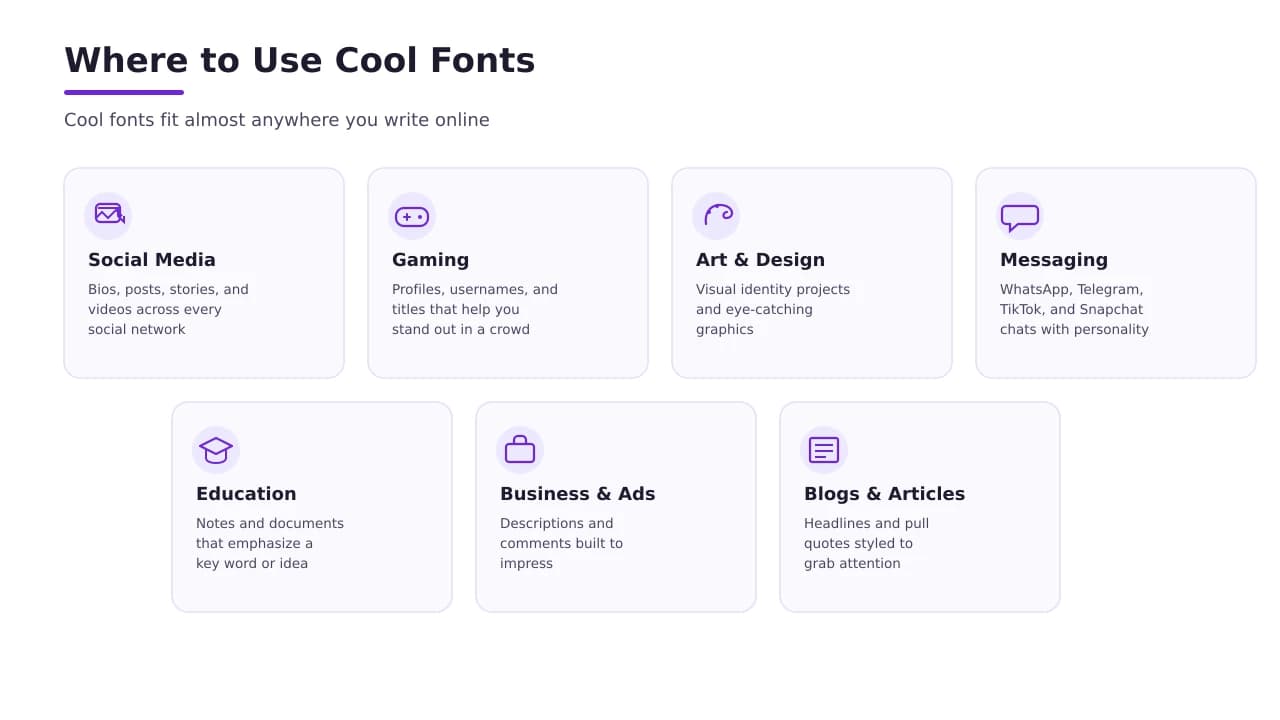
Once you've picked a style, the real question is where to put it. Cool fonts fit almost anywhere you write online, and the possibilities stretch far past social media.
- Social Media — bios, posts, stories, and videos across every social network
- Gaming — profiles, usernames, and titles that help you stand out in a crowd
- Art & Design — visual identity projects and eye catching graphics
- Messaging — WhatsApp, Telegram, TikTok, and Snapchat chats that need a little personality
- Education — notes and documents that emphasize a key word or idea
- Business & Ads — descriptions and comments built to impress
- Blogs & Articles — headlines and pull quotes styled to grab attention
Whatever the platform, the same free font generator handles the text generation. Change a plain word into something beautiful, write a status that gets noticed, or refresh your profile with a unique selection of font styles. It's a small change with a big, amazing effect on how your words come across online.
Social Media
Your social media bio is often the first impression you make. It's the short section where you introduce yourself, so it's worth spending a little time on it. Social media fonts, bio fonts, username fonts, and profile fonts all give you creative ways to make that section stand out.
Most platforms don't build in options to format text. Their apps don't let you italicize, write cursive, or select bold script characters from a settings menu. That's exactly the workaround a font generator provides: type your text, let the converter do its job, then paste the converted, aesthetic result into your bio, caption, or status.
A well-styled profile does more than look nice. It helps followers browsing a crowded feed or busy comment sections recognize you instantly. Unique text symbols and decorative glyphs act like a signature, giving you instant differentiation across every account and social network you use, even if you're just promoting a personal brand.
Instagram Fonts
Instagram lives and dies by its visuals, so your bio and captions deserve the same care as your photos. Aesthetic fonts copy and paste and cute fonts copy and paste are two of the most popular searches for a reason — a little stylish text turns a plain profile into something memorable.
Use profile fonts and bio fonts to introduce yourself, then switch to a matching quote or caption style for your posts, stories, and videos. Pair cool fonts copy and paste emojis with cool font symbols for personal branding that feels elegant, fun, and loving all at once.
On mobile, open the font keyboard version of the tool, type your caption, copy the style you like, and paste it straight into the app. It's an easy, impressive way to keep your profile easy to read and instantly recognizable.
X (Twitter) Fonts
X, still known to most people as Twitter, gives you one plain text field for every tweet. There's no built-in way to italicize a quote or bold a heading, so a lot of users lean on cool text and cool letters to add emphasis to specific words.
Bold, italic, underlined, script, and even old english styles all work inside a tweet, since they're really just unicode and special characters copied and pasted like normal text. Use them to make key words pop against the rest of your message and grab attention as followers scroll past.
Be careful with long, complex tweets, though. If a whole thread is written in a heavy style, your message gets hard to read and your point can get lost. Save these fonts for short posts, quotes, or comments where instant differentiation matters most in crowded comment sections.
Facebook Fonts
Facebook still covers everything from personal posts to business pages, so the look you're going for really depends on your goal. Cool fonts and cool text work well for a personal profile or bio, while stylish text, decorative text, and fancy text help a status or caption catch more attention.
Copy and paste bold, italic, cursive, or script styles into your posts, comments, and replies. If you're promoting a brand across social networks, aim for something more formal — legibility matters more than flash when followers need to actually read what you wrote.
Threads, Reddit & More
Threads, Reddit, Tumblr, WhatsApp, TikTok, Snapchat, and Telegram all force the same boring system font onto your posts, comments, and replies. A cool font generator acts as a bridge, giving you access to bold, cursive, and other mathematical alphanumeric symbols that mimic real typography without needing special software.
That instant differentiation helps you stand out in busy communities, crowded comment sections, and gaming servers where a plain username can feel intimidating to build an identity around. Because the tool is web based, it works seamlessly across platforms with zero downloads. Copy once, and paste the same tags, chats, and posts anywhere.
Folder & File Names
Folder and file names get boring fast when every one looks the same. A little decorative text makes it easier to spot the right folder at a glance.
Enter a new name, choose your preferred style from the categories, and copy the generated result to your clipboard. It's ready the moment you paste it. Because unicode is a universal, digital language, these transformed, formatted letters work the same way on a computer, smartphone, or browser, with nothing to install.
Use calligraphy, typography-inspired letters, or a simple custom text style with unique glyphs and special characters to organize your desktop or drive. It's a small trick, but font style copy paste turns character mapping into a genuinely useful piece of everyday customization.
Chat & Messaging
Chatting on WhatsApp, Telegram, or any forum usually means typing plain text into a basic text box. Swap in a stylish font every once in a while, and even a simple greeting feels more fun and inspiring.
Type your message, copy the converted result, and paste it straight into your chats. Cool fonts copy and paste emojis, cool symbols copy and paste, and cute symbols copy and paste all pair nicely with script characters, cursive, bold, or italic text formatting. A cool symbol or two next to your nickname or username adds a loving, elegant touch without demanding much attention.
Because every style pulls from the same unicode character set, special symbols and custom text copy over cleanly, letter for letter, no matter which app you write in.
Advertisements
Advertisements live or die on attention, and creative text is one of the cheapest ways to grab it. Bold, cursive, or decorative font styles can highlight a title, announce a sale, or emphasize free shipping without hiring a designer.
Use custom text and text customization to make key words pop against the rest of your ad copy, whether it's a video description, a comments section reply, or a full campaign. A little contrast and eye catching styling go a long way toward building a visual identity for your business or brand.
Even outside formal ad campaigns, stylish and fancy text styles make professional emails and posts feel less generic. Type your message, click to transform it, and build a digital presence that's genuinely unforgettable.
Notes & Documents
Note taking apps and document apps organize a lot of information, and a little text formatting helps important sections jump out. A text generator can turn plain text into fancy text for a heading, while the rest of the paragraph stays in standard, regular symbols for easy reading.
Bold, italic, underlined, cursive, script, or even old english work well for titles in personal notes, education projects, and work documents. But save the decorative text and unicode symbols for headings only. Professional emails and documents with vital info should stay mostly in plain text.
Always check legibility before you send something important. Complex styling can make a message look interesting, but if the content gets lost, or a screen reader can't read it aloud for a visually impaired reader, it stops being helpful. Use custom text and special characters to organize your work, not to decorate every single line.
Fancy Text in QR Codes
QR codes usually point to plain text, but you can create something more heartfelt by putting fancy text in QR codes instead. Enter your message into the font generator, copy the styled text it creates, and generate your QR code using that text instead of a plain sentence.
Since unicode is an international standard, the character set and encoding inside your styled message work the same way across devices, browsers, and platforms, so anyone who scans it sees an accessible, correctly displayed result. Mix in special characters, letters, emojis, arrows, math symbols, and punctuation marks for extra personality.
There's one small trade-off worth knowing. Because these are copied and pasted characters, not files, compatibility follows the same cross platform protocol as anywhere else online. The message displays correctly on most modern devices, though a few older devices might swap a character for a plain text message or a small box instead. For a birthday card, gift tag, or wedding invite, this small trick turns a boring plain text field into something worth scanning.
About Cool Font Generator
We built this font generator to solve one small but annoying pain point: creators everywhere feel the same lack of customization on social media. Most platforms and apps force the same boring system font onto every post, and there's rarely a built-in way around it. This tool acts as a bridge, giving anyone access to bold, cursive, script, calligraphy, and dozens of other alphabet styles built from real mathematical alphanumeric symbols inside the unicode character set.
The whole point is instant differentiation. A unique set of glyphs and formatting helps you stand out in a crowded comment section, build a gaming identity that doesn't feel intimidating to create, or simply tag a post with something more interesting than plain text. Because it's a web app, it works seamlessly, cross platform, with no software and no downloads.
Using it stays simple, generally in five steps: open the homepage, type your input, preview and scroll through the selection, click the style you want, then copy the ready result from your clipboard and paste it wherever you write — a bio, a status, a message, or a caption you want to impress people with. The mobile version and font keyboard work the same way, so the experience stays consistent whether you're on a laptop or your phone.
At the end of the day, this cool fonts generator exists so writing online feels a little more like you. Whether you need a quick cool font symbol for a username or a full aesthetic overhaul for your bio, cool fonts copy and paste should be free, easy, and honestly kind of fun. That's exactly what we built this tool to be.
FAQs
What are cool fonts?
They're stylish text styles made from special Unicode characters that make your words look bold, cursive, bubbly, or futuristic without needing any design software.
Are cool fonts real fonts?
Not technically — they're just Unicode letter look-alikes, not actual installable fonts, which is why they show up the same everywhere you paste them.
What are Unicode symbols?
They're the huge library of characters (way beyond A-Z) that every device reads the same way, and it's what lets fancy text travel from one app to another without breaking.
How do I copy and paste cool fonts?
Just type your text into a generator, pick the style you like, hit copy, then paste it wherever you want — no downloads, no fuss.
Why do some cool fonts show as boxes or question marks?
That happens when the app or device you're pasting into doesn't have the right character set loaded, so it can't render that particular symbol properly.
Do cool fonts work on all devices and platforms?
Mostly yes since they're Unicode-based, but older phones, some Android keyboards, and certain apps can be a bit stubborn about displaying every style correctly.
Is fancy text accessible to screen readers?
Honestly, not really — screen readers often skip or mispronounce styled Unicode text, so it's best kept to captions and bios rather than important info.
Are cool fonts free to use?
Yep, completely free — you're just copying characters, not licensing a typeface, so use them as much as you like.
Why do cool fonts work well on social media?
They break the scroll — a bio or caption that looks different from the plain text around it naturally grabs a second glance.
Can I use cool fonts on Instagram?
Absolutely, they're great for bios, captions, and story text and show up fine on pretty much every phone.
Can I use cool fonts on TikTok?
Yes, they work great in your bio and captions, though the on-screen video text editor sometimes won't keep the styling.
How do I change my WhatsApp font style?
WhatsApp doesn't have a built-in font changer, so people just copy fancy text from a generator and paste it straight into the chat box.
Can I use cool fonts in usernames and gaming tags?
Definitely, it's one of the best ways to make your gamertag stand out in a lobby full of plain names — just double check the platform allows special characters.
Can I use cool fonts in professional emails?
I'd skip it — it can look unprofessional or even glitch out in someone's inbox, so plain text is the safer bet for work stuff.
How do I write in cursive letters online?
Type your normal text into a cursive-style generator, copy the result, and paste it anywhere — social media, messages, wherever you want that handwritten look.